
360° Image for WooCommerce
Show a product from multiple angles with 360° Image for WooCommerce. Prepare an ordered image sequence and test the viewer on mobile.
WordPress plugin · v2.0.12.50 €
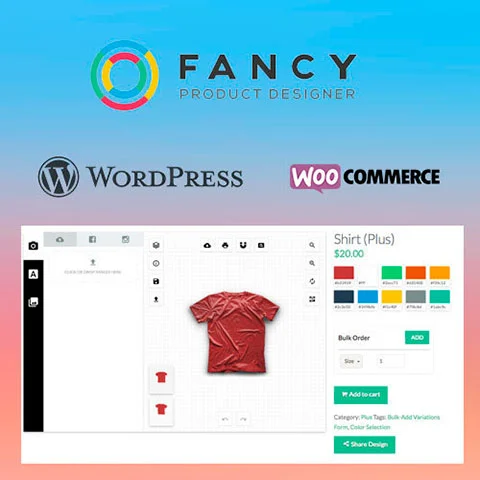
Fancy Product Designer gives WooCommerce shoppers a visual editor to personalize products with text and images. Set up separate views for areas such as the front and back of a T-shirt.
Downloads and available versions for 365 days after purchase.
Review the requirements, included scope and purchase terms (Spanish).
Fancy Product Designer gives WooCommerce shoppers a visual editor to personalize products with text and images. Set up separate views for areas such as the front and back of a T-shirt.
Fancy Product Designer adds a visual editor to WooCommerce product pages. Shoppers can personalize a product before ordering. For example, a print shop can offer a T-shirt with editable text on the front and an image upload area on the back.
Use separate views for the front and back of a product. Give each view a clear name, define where the shopper can add text or upload an image, and check how the controls fit on a phone.
The plugin can load a different design when the shopper selects a WooCommerce variation. Test a size or color that uses a different preview, then check the selected variation and the saved design in a staging order.
Review the WooCommerce integration guide and compare it with the available ZIP. If you need automatic print file delivery, check the separate Pro Export option with the developer before buying.
The version currently shown for Fancy Product Designer is 6.5.4. The download is supplied as a ZIP package. Version numbers can change as the catalogue is updated, so check the version panel on this page again before installing or replacing files on an existing site.
| Product | Fancy Product Designer |
|---|---|
| Type | WordPress plugin |
| Category | WooCommerce |
| Current release | 6.5.4 |
| Package | ZIP download |
Confirm compatibility with your current WordPress, WooCommerce, PHP, Elementor or other required platform version before changing a live site. Create a backup and test the package in a staging environment whenever it can affect layouts, checkout, user accounts, scheduled tasks or stored content.
Read the developer documentation included with the package. If the product extends another plugin or theme, make sure that dependency is installed and licensed separately when required. A listed version confirms the available package; it does not guarantee compatibility with every hosting stack or combination of third-party extensions.
The individual price currently displayed for Fancy Product Designer is 2.50 €. An individual purchase provides 365 days of downloads and available versions after purchase. CLUBWP membership may also provide catalogue access while the membership remains active; compare the two options according to how many products you expect to use.
Before paying, review the purchase terms, the product version and the technical requirements. After a completed purchase, the available download appears in your CLUBWP account. Keep the original ZIP and note the version used on each project so future maintenance is easier.
This page shows 6.5.4. Check the version panel immediately before purchase because the catalogue can receive newer files.
Suitability depends on the product requirements and your website stack. Test it on staging first and verify any required parent product, page builder or platform.
You receive the ZIP package associated with the version displayed on this page, subject to the access and purchase terms shown at checkout.
Fancy Product Designer · 2,50 €
Review the developer documentation and confirm compatibility with your WordPress, WooCommerce, PHP, Elementor or other required platform version. Back up your site and test the package on staging before changing production.
Show a product from multiple angles with 360° Image for WooCommerce. Prepare an ordered image sequence and test the viewer on mobile.
WordPress plugin · v2.0.1
Account Funds for WooCommerce allows customers to deposit funds into their WooCommerce account and use them as a balance when paying. It is a useful extension for stores that want to offer prepaid credit within the purchase process.
WordPress plugin · v4.4.2
Add To Cart Redirect for WooCommerce controls which page the customer goes to after adding a product to the cart. It is useful to customize the shopping flow in WooCommerce with global rules or by product.
WordPress plugin · v1.3.3
Address Autocomplete For WooCommerce. Plugin for WooCommerce automatically completes the address data in the checkout with the help of Google Maps. Simplify payment by reducing manual writing and speed up the purchase form.
WordPress plugin · v1.3.1
Advanced Ajax Layered Navigation for WooCommerce improves layer filtering in WooCommerce stores with AJAX navigation. Includes visual outputs such as color samples, sizes and check boxes to better order the catalog.
WordPress plugin · v2.1.2
Advanced Flat Rate Shipping For WooCommerce Market. Plugin for WooCommerce that organizes fixed-rate shipping methods and display rules in the checkout. Helps show only the delivery options that fit each order.
WordPress plugin · v4.8